The Coding Agent I Use and Why — Pi
Claude and Cursor are great, but sometimes you want to build your own setup. Here's my multi-agent Pi coding system with 12 specialist agents, parallel execution, and persistent memory.
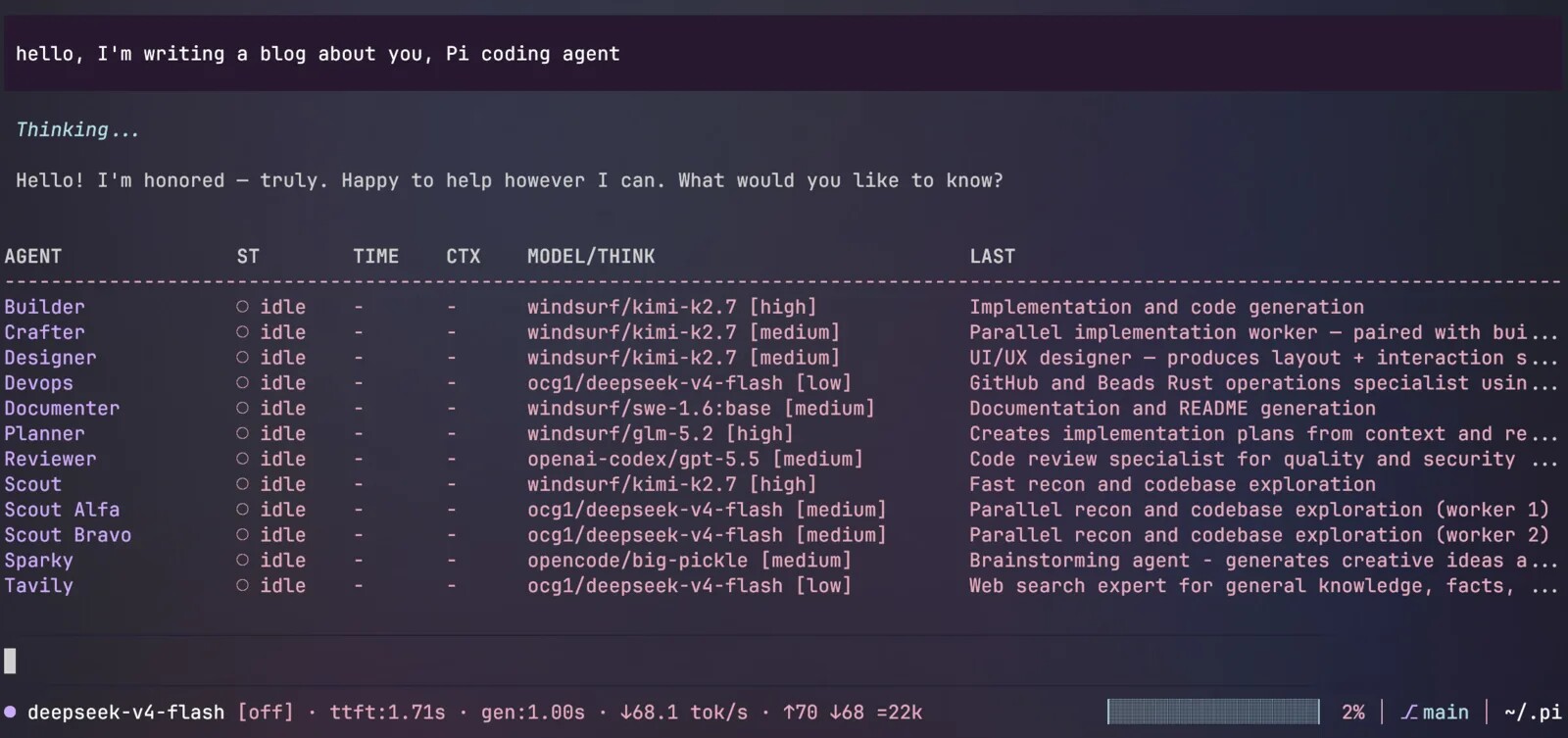
Maybe you’ve used Claude, Cursor, or any of the popular AI coding tools, and you felt some things could be better but these tools aren’t really designed to be modified to the level you would like.
Let me also say yes, these tools are great. But you sometimes need more and wish you could build your own with your preferences. Sometimes you want more than just a config file.
So I built something different for me and Pi allows me to do exactly this.
The Core Idea: The Orchestrator
Instead of one super-agent trying to handle everything, I use a multi-agent orchestrator system where each specialist agent has a single responsibility and persistent memory.
The Orchestrator (the main agent you interact with) has zero code editing tools. It can’t write a single line of code. All it can do is delegate tasks to specialists via dispatch_agent. This forces a structured workflow and prevents the orchestrator from going off-script.
User → Orchestrator → Dispatches to Specialists → Specialists Execute → Results Return to the Orchestrator, then the Orchestrator summarizes or decides what to say to you.Each specialist maintains its own persistent session (builder.json, scout.json, etc.). When a scout investigates your codebase, that intelligence stays with the scout. When a builder implements features, the builder remembers previous implementation patterns. This cross-invocation memory is the secret sauce.
One more important piece to the setup: every agent can have their own LLM. This allows the process to be highly optimized based on the role the agent has.
The Specialist Team (12 Agents, 1 Purpose)
| Agent | What They Do |
|---|---|
| Orchestrator | Pure dispatcher. Routes tasks. Writes zero code. |
| Scout / Alfa / Bravo | Parallel reconnaissance. Three scouts can explore different parts of your codebase simultaneously. |
| Planner | Creates implementation plans before any coding begins. |
| Builder | Implements code based on plans. |
| Crafter | A second builder that can work in parallel for independent edits. |
| Reviewer | Quality verification and code review. |
| Designer | UI/UX specifications. Produces specs, never code. |
| Documenter | Creates and maintains documentation. |
| Tavily | External web research for APIs, libraries, and solutions. |
| Sparky | Brainstorming. Generates 5-7 options and explores alternatives. |
| DevOps | GitHub operations and issue tracking. |
The Technical Deep Dive
The heart of the setup is agent-team.ts — the dispatcher that routes tasks to specialists using a structured dispatch format. Team configurations (full, plan-build, info, brainstorm) enforce consistent workflows. A real-time dashboard shows agent status in grid, table, or tactical views.
Verification-First Philosophy
The system is guided by four principles:
- Think Before Coding: Surface assumptions, don’t hide confusion
- Simplicity First: Minimum code, no speculative features
- Surgical Changes: Touch only what’s necessary
- Goal-Driven Execution: Define success criteria, loop until verified
Structured Dispatch Format
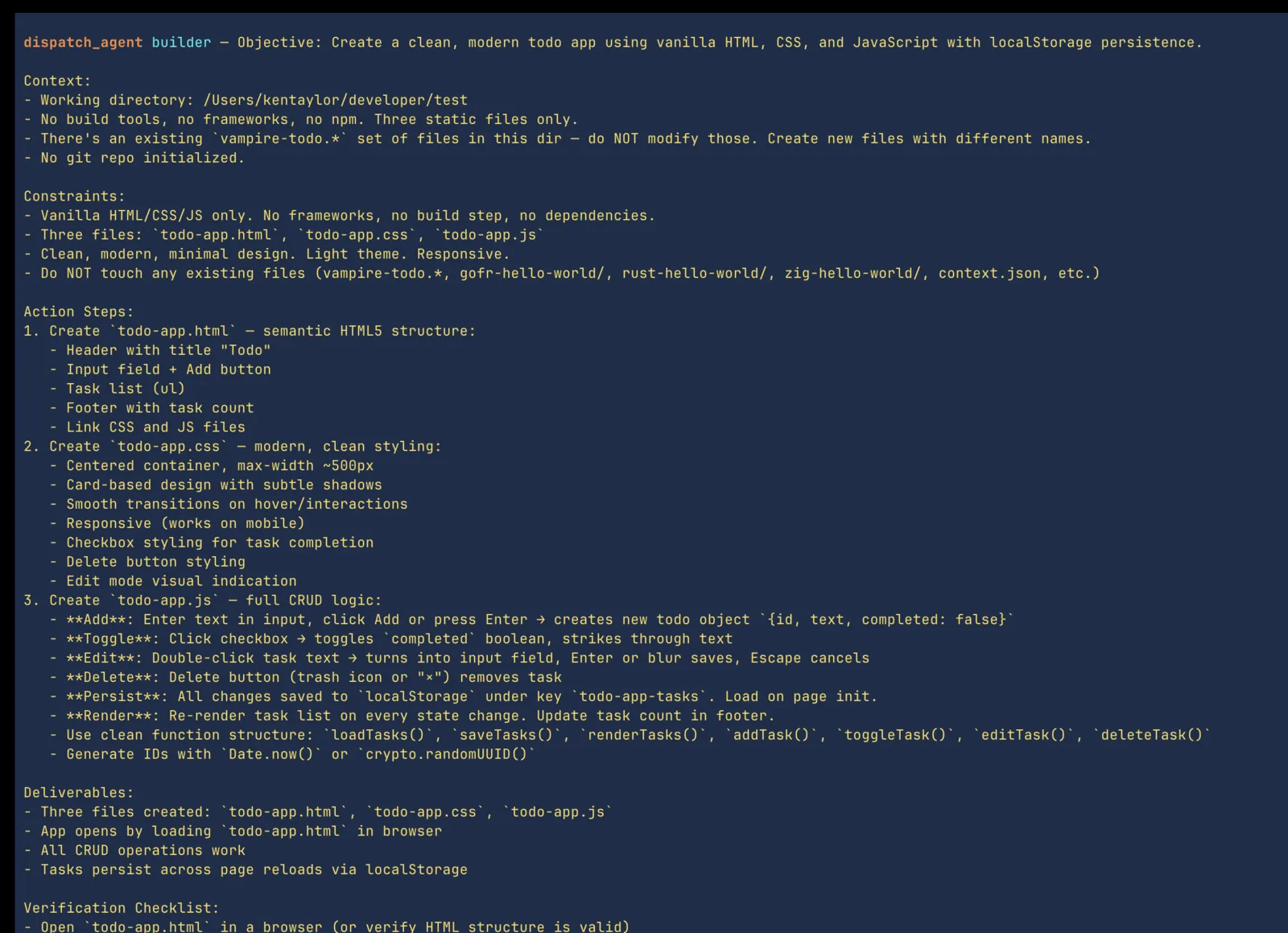
When the Orchestrator delegates, it uses a 10-section format that prevents hallucinations and ensures quality:
- Objective (clear goal)
- Context (comprehensive, assume agent knows nothing)
- Constraints (boundaries)
- Action Steps (hierarchical with verification commands)
- Deliverables (expected outputs)
- Notes (additional considerations)
- Prerequisites (what must be in place)
- Uncertainty Protocol (specific failure modes)
- Verification Checklist (success criteria)
- Anti-Hallucination Reminder (concrete facts)
So in simple terms when the orchestrator dispatches work to an agent it gives all the necessary context to get the task done.
Here is a screenshot of what the dispatch prompt looks like to the builder agent after I say “Create a todo app”.
Model Flexibility and Thinking Budgets
Each agent can be assigned a different model via /agents-models. Scouts can use cheaper, faster models while Builders get the most powerful ones. Each agent also has configurable thinking budgets.
Supported providers include DeepSeek (free, 1M context), self-hosted Llama/Qwen, WindSurf, OpenAI Codex, OpenRouter, and more. Yes I said Windsurf, yes I use Windsurf models in Pi.
Background Processing and Parallel Execution
Three agents can scout your codebase simultaneously. Builder and Crafter can implement independent edits in parallel. The btw.ts extension runs background assistants with live streaming overlays for exploratory tasks without cluttering the main conversation. The subagent-widget.ts spawns background subagents with persistent sessions.
Though these are background tasks the user is still able to observe all that going on and control what happens if necessary.
The Extensions Ecosystem
Now people will often say this is the main reason to use Pi and that’s the extensions. Pi comes with basic tools out the box: read, write, edit and bash. That’s it, nothing else.
Some see it as limiting. I see it as the perfect surface to build my personal agent.
Some of my most used extensions and what they do:
/loopfor iterative tasks with breakout conditions (tests pass, custom condition, self-driven)btw.tsfor side-channel background assistants/subfor spawning background subagents with persistent sessionspermission-gate.tsblocks dangerous commandsprotected-paths.tsenforces path-based safety rules
The Big Idea
This isn’t just another AI coding tool. It’s a development team simulator with specialists with persistent or non-persistent memory, parallel execution, and structured workflows.
The Orchestrator manages the team. Specialists maintain expertise. Each specialist has their own system prompt. Orchestrator knows the entire app idea, specialists need to only focus on the task in front of them.
How to Get Started
Want to try something similar? Here’s the high-level path:
- Set up Pi with the
agentenvironment - Define your specialist agents with clear responsibilities
- Implement the dispatcher pattern (orchestrator only delegates)
- Add contexting for semantic codebase understanding
- Create structured dispatch formats to prevent hallucinations
- Add verification loops (test until pass, self-driven breakout)
There’s a lot I didn’t say just so this document isn’t too huge. The full setup is open source and available in my git repo here. If you’re curious about specific components, reach out — I’m happy to dive deeper into any part of the system.
Written from Guyana, South America, where I’m still building things, still coding, and still figuring out how to make AI work for me instead of the other way around.
About The Author
Ken Taylor
Self-taught Guyanese software engineer and entrepreneur from Georgetown, Guyana building tech solutions for the Caribbean.
# Related Posts
I Joined a Hackathon to Meet Guyana’s Developers. Somehow, We Came Second.
I signed up for Innovation Challenge 2026 to meet Guyanese developers. Three days, almost no sleep, one prototype, and a second-place finish later, I got exactly what I came for.
Local LLMs on Intel Arc: Why Running AI at Home Just Makes Sense
A cheap gaming GPU, some clever model architecture, and a coding agent that runs on local AI. Here's what I've learned hosting LLMs on an Intel Arc B580.